Sunday, 30 October 2016

Planning Social Media Content? Ask Yourself These 9 Questions


It's no mystery that social media is a crucial part of any marketing strategy -- regardless of industry, company size, product, or service.
We've all been there. Back in the day, I had to make the case for some businesses to even have a social media presence in the first place. But finally -- finally! -- it seems like folks are catching on. After all, 69% of marketers are using social media to build a following.
Now that most marketers really do understand that social media is a strategic must-have, how can we make it more manageable? Like many other things in life and in business, planning ahead is the way to go. 

Manage and plan your social media content with the help of this free calendar template.


To avoid becoming one of those brands whose Facebook page hasn't been updated in months -- and we've all seen them -- learning to plan and schedule your social media posts in advance is key. But how? We've outlined nine crucial questions to ask when you start this planning process, along with some helpful tools and resources to help along the way.

9 Questions About Planning and Scheduling Social Media

1) What are you promoting?

Part of planning your social media presence is knowing what you’re there to talk about. Maybe you have a looming product launch to promote, a holiday special, or a particular piece of content to get in front of the public eye.
In any case, knowing what you’re promoting should run in tandem with your social media schedule. Do you have multiple product or content launches taking place over the course of the year? That’s where a calendar is particularly useful -- not only to announce the launches themselves, but to drop “teasers” leading up to them.
That’s also a good place to plan other pieces of your online presence, like your blog, around these launches -- especially considering that 84% of marketers integrate social media with their overall marketing plans.
Let’s say you’re launching an annual report, and you want to use social media to push a high number of downloads. In the days leading up to it, your blog can feature smaller pieces of content pertaining to the different findings within that report. That creates a top-of-mind presence of your brand and your content, among your audience -- just in time for the big launch.

2) What are your goals?

In 2015, Google did a study of Digital Leaders -- the folks who have seen success with digital marketing -- versus Digital Learners -- those who have not. Out of the two, a whopping 92% of Leaders had clear digital marketing goals, compared to only 69% of Learners.
Those numbers illustrate the importance of outlining goals when planning social media posts and campaigns. That doesn’t mean they have to be dry or boring -- it just means that even funny or out-of-the box posts still need to be aligned with what you’re trying to accomplish.
Just have a look at this collection of Twitter success stories, and the subhead introducing them: "Learn how businesses from around the world achieved their goals with Twitter."
In the Greenhouse software case study, for example, there’s a very clear objective stated: “The marketing team at Greenhouse was focused on acquiring new subscribers for their weekly newsletter," which was "focused on increasing brand awareness and purchase consideration."
Notice how there are three pieces to the Greenhouse goal:
Increase awareness → newsletter subscription → purchase consideration
In addition to overall greater brand awareness, Greenhouse experienced 15% increase in newsletter subscribers within one short month. But remember -- it was a two-pronged approach. In order to drive purchases, Greenhouse knew that its digital marketing would first have to aim for brand awareness, which would drive newsletter subscriptions.
Think about your ultimate goal -- be it sales, downloads, or event attendance -- and consider the smaller pieces that will lead to it. Then, shape and schedule your social media presence around those variables.Social Media Conten Template

3) Who is your target audience?

Here at HubSpot, we’re big on buyer personas -- the semi-fictional “characters” that encompass the qualities of who you’re trying to reach.
Outlining your personas is a vital part of planning your social media presence. It’s one of the best ways to determine the needs, goals, and behavior of your potential customers, which can dictate how you digitally convey a product or service. In turn, that can help you understand the voice to use when trying to reach that audience. It works -- 82% of companies with better value propositions also use buyer personas.
When you plan and schedule your social media, think about your personas. What are they looking for? What motivates them? What’s going to help them? How are they going to feel at a given time of year? Answering those questions can help determine what kind of media your personas are consuming. To get started, check out HubSpot’s MakeMyPersona tool.

4) What can your audience do with what you’re promoting?

Earlier, when asking about your personas, I posed the question: “What’s going to help them?”
That’s part of the reason why it’s so important to know who your personas are -- to make sure that they can actually do something with the content you’re posting on social media. When you plan or schedule a social media post, ask yourself if it’s going to interest, benefit, or ultimately delight your target audience. If the answer is “no,” reconsider sharing it.
Also consider what’s wrong with it. Is there something specific that’s making your social media posts less sharable or engaging? Even the network you’re using can have an impact, since different types of content have varying results, depending on the platform.
Which brings us to our next question ...

5) Are you planning accordingly for each network?

Not all social media is created equal. Different platforms attract different audiences. Plus, each one has its own “secret sauce” of when to post, and how often -- check out the best times to post to each network.
Remember your buyer personas? As you figure out who they are, it’s also important to determine where they “live” online, and what kind of media they’re consuming -- that will help you plan your social media presence for each individual network. It might be helpful to review the Pew Research Center’s Demographics of Social Media Users, which profiles the users of five major social media platforms -- Facebook, Pinterest, Instagram, LinkedIn, and Twitter.
While you’re at it, have a look at HubSpot’s Social Media Content Calendar. With a tab for each social network, it’s easy to plan posts by month, week, or even day. That’s an asset when it comes to the networks that require multiple posts per day, and can aid in planning for seasonality.
And speaking of seasonality ...

6) Are you promoting seasonal content?

I don’t know about you, but I love the holidays. But I also like them with the right timing -- in other words, I don't get excited when I hear carols and bells in October. Too soon, right?
That said, it’s still a good idea to start planning your social media holiday presence early on. And, it’s important to understand how your personas behave during certain times of the year -- there’s a big difference, for example, between B2B and B2C audience behavior during the holidays.
For B2C, it’s a bit more clear-cut. Brands see more first-time buyers during the holidays than they do during the rest of the year, when shoppers are “more influenced by brand allegiance,” writes SocialTimes’ Kimberlee Morrison.
For that reason, it’s important to use a calendar to schedule posts that will both engage potential first-time buyers, and keep them coming back after the holidays. That’s called reactivation -- and according to Monetate, it's imperative if you don't want to your first-time customers to be part of the 86% of them who never come back.
In the B2B sector, it’s less about influencing purchases and more about increasing brand awareness. Around the holidays, for example, B2B companies are encouraged to promote sharable content that’s both seasonally-oriented and branded. That’s especially true on Facebook, which people browse 4.2X as much as they do search engines before shopping. So while you might not be offering a holiday promotion, you’re still aligning with the mood of your buyers -- and keeping your brand at the top of their minds.

7) Are your posts agile enough to be replaced or rescheduled on short notice?

Despite our best planning efforts, unexpected things still come up. The world keeps turning, despite what our social media schedule dictates -- which is why it’s important to keep it flexible.
When you plan your social media presence, it’s generally a best practice to leave open slots for things like breaking news or the content that you develop around unexpected current events.
My colleague, Susannah Morris, uses HubSpot’s Social Inbox app to flexibly plan social media this way. “I schedule out evergreen content and curate it as I go,” she says, “leaving slots to fill in with new content, newsjacking, or other interesting things closer to the time.”
In other words -- things come up, so be sure to allow for them as you plan your posts ahead of time. But make sure you have a back-up plan, too, and a backlog of timely, sharable content to use as an alternative.

8) What’s performed well on your social networks in the past?

There’s a reason why 72% of marketers analyze their social media activity -- they want to see what's working.
But conversely, only 42% of marketers believe they can do such an analysis. Measuring the ROI of social media is known for being a bit tricky. Which network performs best? What kind of posts? What time of day? It’s answering all of the questions we’ve posed so far, and finding out if your answers to them are effective. And that data on what's working -- as well as what isn't -- will ultimately influence your future social media posts.
Digging into that data doesn’t have to be so complex, and there are quite a few resources that can help. Some social media platforms, like Facebook and Twitter, have their own analytic tools that provide some insights into post performance. And in your HubSpot software, you can use the Sources report to measure the ROI of your marketing campaigns, including details on how social media is driving traffic to your site -- those are things like visits from links clicked on Facebook, Twitter, LinkedIn, and more.
But in the case that you also have to illustrate the effectiveness of your social media -- especially when using that data to plan and schedule future posts -- it can be helpful to compile a monthly report that can shed detailed light on performance. Not sure what kind of data to include? Check out our ebook on how to present and prove your social media ROI -- it comes with some templates to help you get started.

9) Have you identified influencers?

When it comes to genuinely reaching your audience, trust is huge. That’s why so many of us seek the advice of friends and family in choosing a product or service -- 83% of people trust their recommendations more than anyone else’s.
But then, there are influencers -- people considered to be leaders and trendsetters in their respective niches (think: bloggers). Many times, brands partner with influencers because the public listens to what they have to say. In fact, 49% of Twitter users say they count on recommendations from influencers first.
There’s a reason why it’s called social media. We've come to think of contacts on these networks as reliable acquaintances, even if we’ve never met them in real life. That’s why people like influencers have earned a so much consumer trust, and why marketers are partnering with them.
In fact, many businesses say that they earn $6.50 for every $1 they invest in partnerships with influencers. That’s because influencer campaigns are a bit like economical celebrity endorsements -- people have come to recognize, follow, and trust what they have to say.
But many marketers say that finding the right influencers to work with can be challenge. For that, we recommend following a process similar to identifying your buyer personas, to make sure the influencers are aligned with what your brand represents, as well as your goals. And be sure that it’s a mutually beneficial partnership -- much like a co-branding agreement, it’s important to determine what you can offer an influencer in return.

Ready to start planning?

With the right tools, managing social media isn’t so overwhelming. And planning ahead can help to create that peace of mind, especially when you allow for the flexibility we discussed earlier.
But make sure you’re not overdoing it. The amount of time spent on social media can vary from marketer to marketer, and can even depend on your industry. Answering these questions and following the right steps accordingly will help determine what works for you.
And as social media continues to evolve, we’ll be here to let you know about it, and what it means for you.
How do you plan and schedule social media? Let us know in the comments.
free social media content calendar template
Author: 
Source


Saturday, 29 October 2016

Facebook Advertising Advice: 10 Tips From Experts at Trello, WeWork & More

Facebook started as a way for college classmates to communicate, and it’s since evolved into a hub for content creation, sharing, and advertising.
Over one billion active users engage on Facebook every day, which represents a tremendous opportunity for advertisers to leverage their content in front of potential customers.
The variety of targeting options available allow marketers to get the greatest value out of each ad dollar spent on this vast network, making it an ideal place to drive conversions, downloads, and lead generation. In fact, Social Media Examiner found that 55% of social media marketers use Facebook as their primary platform, and eMarketer learned that nearly 68% of all social media ad spending is on Facebook Ads

Download this free guide for data-backed tips on creating the optimal Facebook Ad.


We decided to consult with a variety of successful social media marketers to learn more about their strategies for Facebook Ad targeting. Whether you’ve been advertising on Facebook for years or are just starting out, check out these lessons from the pros to maximize your social media advertising ROI.

10 Strategies for Facebook Advertising

1) Keep track of qualitative metrics.

Matt Diederichs, Social Marketing Lead at Hootsuite:

We focused on two metrics [in our Facebook Ads campaign] -- video views and offer redemptions. Video views are primarily an efficiency spend, looking at the gross number of video views we can get for our investment, at the lowest possible CPV (cost per view). In the offer redemption area, we can go a bit deeper and also calculate our CPA (cost per acquisition) for each person who redeems the offer. These help us to understand whether it's worth our investment to pay for direct customer acquisition.
Through all of this, we [also] look really hard at qualitative feedback. Facebook's Reactions allow us to see not only how many people 'like' our content, but also when people 'love' or uh ... [don’t] love our content. We also aspire for our content to be shareable, so we look for post shares and for comments on Ads. To us, that's a leading indicator of content resonation.”

2) Take advantage of Facebook's precise Ad targeting.

Shari Medini, Co-Host of the Push Pull Sales & Marketing Podcast:

You can target any audience [using Facebook Ads]. Almost everyone is on Facebook, and we all share incredible amounts of information about ourselves. Facebook compiles and organizes all of that data for their Ads platform so that marketers can go as broad or as narrow as they’d like. You want to target moms of young children in a 15-mile radius from a [children’s] clothing consignment store? Facebook lets you do that. You want to get young men in the sales profession between the ages of 30 and 35 to click through to your site? Facebook lets you do that.”

Andy Odom, Digital Marketing Director at Santander Consumer USA

Use the Audience Insights feature in your Ads Account to research all of Facebook, fans of your Page, or people in any custom audience to gain better insights into who they are and how to target them. You can upload [an email list] as a custom audience and serve special ads just to them.”

 Haidi Zhu, Head of Performance Marketing at WeWork:

[With Facebook Ads,] we start by analyzing the demographics of our current members to better understand who they are based on location, interests, industry, and more. We use this data to develop audiences to identify potential members and further segment down to deliver ads that feature the WeWork offerings, locations, and services that we strongly believe will benefit them most.”

3) Test different creative assets for best results.

Frank Emanuele, Co-Host of The Marketers Next Door Podcast:

Always A/B test your creative [assets]. It's easy to think you know what will capture your audience's attention, but you'll be surprised when you actually test it. I always compare at least two options and track their performance carefully. Then I put my spend toward the top performer to get the most bang for my buck. I often find that the creative I liked best actually isn't my top performer."

4) Pay attention to what visitors do after they click.

Alicia Palmieri, Senior Social Media & Content Specialist at 2U:

2U uses the "Learn More" call-to-action because it performs well with the type of thought leadership [education] content we share.
Our end goal when advertising on Facebook is to get people to view longform, data-rich content. Since we host most of this on our website, we work with our web analytics team to track behavior of people coming from our Ads. This helps us ensure that we’re targeting the right people and providing engaging content that they will enjoy.”

5) Don’t force new trends into your Ad strategy.

 Rachael Samuels, Social Media Specialist at Sprout Social:  

It's important to have a clear objective for your ads, clear KPIs and a desired cost-per-conversion. Identifying these metrics, setting up proper tracking and keeping a pulse on performance is key to determining ROI from social advertising."

Aaron Moreno, Digital Advertising Specialist at Sprout Social:  

The social landscape is constantly evolving, and our social team is constantly adapting to meet the needs of our community and stay authentic in our social presence. It's great to be aware of trends, but you shouldn't force a trend or new network if it's not the right fit for your brand. You have to determine a trend's genuine value offer before diving in headfirst. If something isn't resonating with your audience, there's no reason to continue chasing the hype just to be seen doing it -- your audience could see that as a major turnoff."

Chelsea Hunersen, Social Media Manager at HubSpot:

The principles of creating a good post and grabbing attention are the same no matter what the medium. For example, providing clear value and connecting about [your audience’s] real needs is something I always try to do. I'm less concerned about using a new medium like video or canvas just to use it, but I will try it if the technology gives us a better way to reach our audience.”

6) Find inspiration from your competition.

Rebecca White, Community Manager at TrackMaven:

Being able to tell what your competitors are promoting on social is invaluable. Comparing our Facebook spend with that of our competitors gives us a level playing field on which to evaluate the impact of our content."

7) Publish videos that are short and sweet.

Erica Moss, Community Manager at Trello:

Because [Facebook offers] such a small amount of real estate, it's important to get to the point quickly with one specific call-to-action, whether it's a discount to redeem, an event to attend or a prompt to learn more about your product or service. Avoid lofty or flowery language.
When considering images, faces and bright colors pop more (high-res only), and video can be super impactful for ads when kept to 30 seconds or less. Bonus points if your video has closed captioning so that users don't need audio to consume your message.”

8) Don't fixate on vanity metrics alone.

Jenna Dutcher, Content Marketing Manager at Localist.com:

Facebook Ads can be a valuable tool, but only if you put effort into actually optimizing and measuring them. We’re big fans of A/B testing here at Localist, and always have at least two iterations of an ad running, sometimes 10-20 versions, where we’ll test things as small as capitalization, imagery, headlines, and CTAs.
You also need to be mindful of what you’re measuring. Success can’t just be based on how many people click or view an ad -- what does 500 clickthroughs to a post mean to you and your company?  Be sure to tie superficial metrics like this to an acquisition goal or metric that you actually value, like cost-per-download or cost-per-lead.

9) Focus on the mobile experience.

Jason Myers, Social Media Manager at The Content Factory:

Try composing, or at least previewing, your Ad on a mobile device. Most people view Ads on a phone screen which is why those with stark, text-free images and simple messages get more engagement.”

10) Experiment with video.

Ben Kessler, Director of Marketing at WeWork

We are always eager to test new products and the latest betas to innovate with our marketing. This includes 360” video, renderings, and more, all developed by our in-house team. Because WeWork is truly something you need to experience in person, we’ve seen a lot of success with video to convey our brand and message within Facebook.”

Learn From the Pros

Now that you’ve learned different strategies for successful Facebook Advertising, apply them to your next campaign. A common thread among the responses we received for this article was the importance of constantly testing and evaluating results.
Don’t hesitate to change tactics midway through a campaign to drive greater value and conversions from your Ads. If you’re unsure where to begin with launching an Ads campaign, we have a step-by-step guide to start you off on the right foot.
What advice would you give for Facebook Advertising best practices? Share with us in the comments below.
free guide to facebook advertising

Author: 
Source

Friday, 28 October 2016

A Smart Twitter Content Strategy You Need to Use


A Smart Twitter Content Strategy You Need to Use

Not sure how to make the most out of your Twitter content?
Wondering how to get more mileage out of every single tweet?
Repurposing content is a secret all smart Twitter marketers use to maximize exposure.
Not only do you breathe new life into content you’ve already created…
…But you extend the reach of your tweets.
That’s what makes this smart Twitter content strategy simple, but powerful.
Instead of creating, curating and tweeting content all day long, you repurpose your most popular content.
Want to get started?
Below are 13 ways you can take a single tweet and turn it into 13 new pieces of media.

A Smart Twitter Content Strategy You Need to Use

What does “repurposing content” mean?

I’m sure you’ve read about people who repurpose their content, and maybe you’ve tried it yourself, but do you REALLY know the power of repurposing?
Each piece of content you create starts with an idea…a good idea.
You map out the framework for how that idea will offer value to your audience.
You provide tips and solutions that will solve their problems.
In other words, you craft a piece of content you’re proud of.

Now what? That’s it?

This is where the power of repurposing comes in.
The valuable ideas you had when you sat down to write that piece of content don’t suddenly become useless after you tweet.
As a matter of fact — you can use that same idea to create dozens of additional pieces of content — across multiple channels.


Repurposing content is a mindset. It’s a content philosophy that will allow you to crank out high quality content fast and frequently (often leaving people scratching their heads).
It’s a way to ensure that your ideas always stay relevant and top-of-mind.
It’s a way to repackage your Twitter content in new ways that will attract a new audience.

Let’s take a single tweet for example

I can think of 13 ways you can repurpose a single tweet.
But before you get started — you need to have some good tweets to choose from!

Or, better yet…

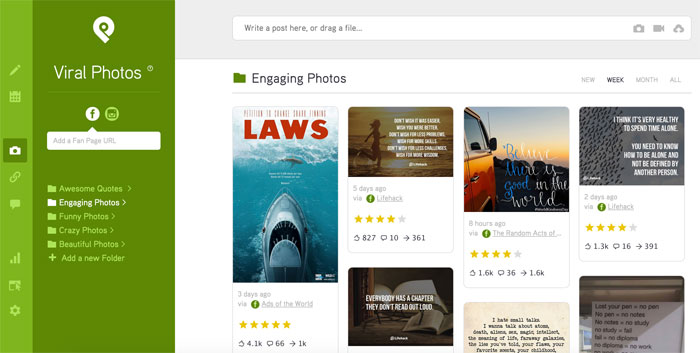
Use the Post Planner app to choose from thousands of viral photos you can tweet.
This is content that is already proven to be successful, and it will take all the guesswork and time out of finding content to tweet.
IMHO, it’s a no brainer!

ways-to-repurpose-tweets

Once you’ve started tweeting super good content, here’s what to do next:

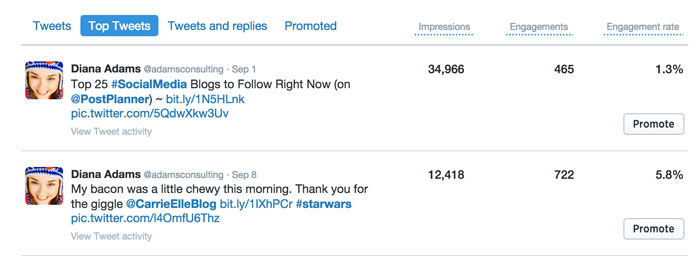
Check your Twitter Analytics. Which tweet got the most engagement over the past 90 days?
I went into my own Analytics and found that my tweet with the highest engagement over the past 90 days was a tweet that showed a slice of bacon and hash browns that looked like a wookie.

ways-to-repurpose-tweets

That tweet had a 5.8% engagement rate, which is pretty high.
(All credit for this Star Wars breakfast work-of-art goes to Carrie Elle)
As you see, there was another tweet with almost 3 times as many impressions, but what we are looking at here is engagement.
Another option is to look at your Google Analytics to see what your most popular posts are and repurpose those.
But since we are focusing on repurposing a successful tweet in this post, we’ll stick to Twitter Analytics.
The tweet with the Chewbacca bacon will work just fine.
(after all, who doesn’t like bacon?)
Either way, repurposing content will build thought leadership and influence around your niche.

Now comes the fun part

Look at the list below and follow the journey of social media engagement that can come from one tweet.

1. Create a SlideShare of Top Tips

You could easily create a SlideShare that gives step-by-step directions. Here’s one we created a while back that did exactly that.
Just think, if  I repurposed my tweet into a slidedeck, anyone could make their own wookie bacon on Saturday morning! ðŸ˜€
But no matter what tweet you’re repurposing, remember:
Tutorials work well on SlideShare. Find a way to teach and tell, not sell.

2. YouTube Video of SlideShare

You can turn your tweets into SlideShares and those into YouTube videos.
Or turn it around. Turn your YouTube videos into SlideShares.
Better yet, do both so you get the most reach.
It’s simple when you think about your industry and all that you tweet about daily. Consider something like this from Technology Guru’s.

It’s short and to the point, but powerful in it’s ability to reach a whole new audience.
Now take that video and tweet it!

3. Infographic

Gone are the days when you have to hire a designer for a stunning infographic!
There are plenty of free tools that you can use to create your own infographic quickly and easily.
I recommend trying CanvaPiktoChart or GoodLabs.


You could easily take your original tweet and break it down into something more detailed like the SlideShare or YouTube you created.
It would barely require any more work.
See how easy this repurposing stuff is?

4. Livestreaming (Periscope, Facebook Live)

People want to see you making this Star Wars breakfast so livestream it!
Livestreaming allows you to connect with your audience on a whole new level.
When the recording is complete, write a follow up post and embed the livestream right into your site.
At this point, you are becoming pretty well known for your wookie breakfast.
Klout has even added Star Wars to your list of expert topics, and people are starting to ask you some specific questions.


One Twitter follower asked, “How do make scrambled eggs and fruit look like Star Wars too?”

5. Share a Question on Quora

Now is the perfect time to share that question on Quora.
Get some great answers? Tweet a link to them!

6. New Blog Post

After thinking about how to answer that question, you decided to write a third blog post that explains how to create scrambled egg tie-fighters and turn blackberries into Millennium Falcons.
There are so many people engaging with your content now!
Keep the momentum going.
You are nowhere close to being finished with repurposing that single tweet!

7. Webinar

You’ve got plenty of content now to make some PowerPoint slides and host a webinar.
You invited another Star Wars fan to co-host the webinar with you, and you’re both promoting it on your social networks.
In this webinar, you’ll talk about all kinds of Star Wars food designs — and of course you’ll circle back around to the original wookie bacon and hash browns.
After all, it’s tricky getting that wookie shade of brown just right, but you’ll instruct your audience how to do it easily!
Oh, and while you’re at it, go ahead and create another SlideShare for your webinar.

8. Quote Images for Twitter

Quote images work well on Twitter, and as long as you remember to use a hashtag in your tweet, you can capture the prime real estate in Twitter search (if your picture is high quality).
Pull the images from the Star Wars breakfast foods you created for your webinar slides (they are right there on your camera roll).
Use a photo-editor to crank up the colors (vibrance, saturation, contrast, brightness) and optimize each image for Twitter.
In other words, make it a horizontal image. Vertical images don’t get as much engagement on Twitter.
Then, drop those images into CanvaRelay or Over to add a Star Wars quote on each one.
Now tweet these with a link to your blog and the #StarWars hashtag.
You’re really on your way now!
But we’re not finished yet…

9. Bullet Point Images for Pinterest, Facebook and G+

While you’re at it creating those Twitter images, how about create some customized graphics for Pinterest, Facebook and G+?
Unlike Twitter, you can use a vertical image on the other 3 big sites, and they typically do well (again, IF your images are high quality).


Instead of putting a quote on these photos, how about put a funny bullet point list with 4 reasons why bacon and wookies combined make the best breakfast ever.

10. Email Autoresponder Series

It’s time to get your email list included on all this Star Wars fun.
It’s the perfect time to gather all the content you have so far and create an autoreponder series.
Don’t forget to include a call-to-action!

11. Interview / Podcast

Now you’re probably about 3 weeks into the repurposing project for your tweet.
People are starting to ask you some very specific questions about your kitchen.
They want to know what kind of knives you use when creating your Star Wars creations, and they want to know if one kind of bacon works better than another.
You’ve decided to invite your favorite food artist on Twitter to be the special guest on your podcast.
You’ll answer all the questions that people have about your wookie design and kitchen, and you’ll also interview the food artist about general tips and tricks to save time while making food art.
The interview goes even better than expected, and now you have plenty of content for a new blog post too!
Don’t forget to embed your podcast.

12. Free Bonus Material for New Opt-In Subscribers

You guessed it!
Now when anyone opts into your email list, they’ll receive a link to your blog post and podcast — which will give them 15 time-saving expert tips to make food designs lickety-split.

13. Ebook

You didn’t even realize this was going to happen…but suddenly you’re an expert on Star Wars food designs.
You have so much content now that it would be nice to consolidate it all in one place.
How about an ebook?
Don’t run and hide!!
Many people are intimidated by the thought of putting together an Ebook, but just remember, you don’t have a deadline so you can take your time with it and have fun!
I recently wrote my first Ebook, and it was a wonderful experience.
Mine was about 18 pages (gDoc), which translates to about a 25 page Ebook (with the design).
You can click over to Fiverr to find the perfect designer who can bring your words to life!

Conclusion

There you go!
You have now taken a single tweet and repurposed it 13 times.
With each repurpose, you are further establishing yourself as a leader in your industry.
When you add all the social media promotion that goes along with these 13 tactics, you have an entire marketing campaign that will continue to generate website traffic for months after it’s over.
So go choose your most engaging tweet and get to work.

There is all kinds of online goodness waiting for you on the other side!!

Author:  
Source